Community V2: The Social Experience Your Coaching App Needs
Pinned posts, polls, threaded replies, reactions, GIFs and more. Community V2 brings social media level engagement to your coaching app.
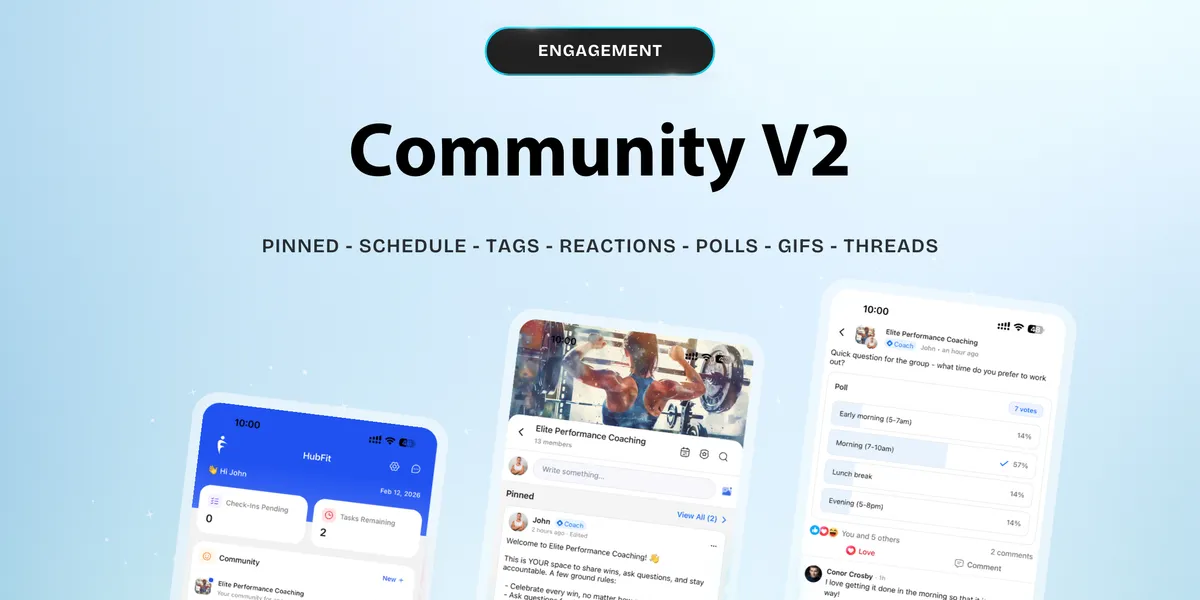
Your clients already know how to scroll, react, and engage on social media. Now imagine that same energy inside your coaching app.
We’re thrilled to announce Community V2, our biggest update yet. We rebuilt the community experience from the ground up to feel like the social platforms your clients already love, while keeping everything under your brand and your control.
No more scattered WhatsApp groups. No more losing clients to the noise of public social media. Community V2 brings connection, conversation, and engagement together in one place.
What Makes Community V2 Different
We didn’t just add a few features. We rethought what community should look like for fitness and wellness coaches.
Community V2 is built with the familiar feel of platforms like Facebook, the kind of social experience your clients already understand intuitively. That means less friction, more participation, and a space your members actually want to spend time in.
Here’s everything that’s new.
Stay in Control of Your Content
Pinned Posts let you keep your most important announcements, rules, or resources right at the top where everyone sees them. No more critical updates getting buried in the feed.
Scheduled Posts mean you can plan your content calendar days or weeks in advance. Batch your posts on Sunday, and they’ll go live throughout the week without you lifting a finger.
Draft Posts give you the freedom to start writing, step away, and come back to finish when inspiration strikes. No more losing half-written posts because you had to close the app.
Edit Posts lets you fix a typo, update a link, or refine your message after publishing. Because getting it right matters more than getting it first.
Spark Real Conversations
Tags & Mentions bring the @mention experience your clients expect. Call out a member to celebrate a win, ask someone a question, or pull them into a conversation. It makes the community feel personal.
Threaded Replies keep discussions organized. No more scrolling through a wall of comments trying to figure out who’s replying to whom. Every conversation stays clean and easy to follow.
Polls are one of the simplest ways to boost engagement. Ask your community what workout they want next, what topic to cover in your next live session, or just have a bit of fun. People love to vote.
Let Members Express Themselves
Reactions & Emojis go beyond the basic like button. Members can celebrate, laugh, show love, or cheer each other on with a full range of reactions.
GIFs add personality and fun to every interaction. Sometimes a well-timed GIF says more than words ever could. Your community should feel alive, not sterile.
Built for Everyday Use
Search Posts makes your community a living knowledge base. Members can find past discussions, saved tips, or that one post they remember from last month in seconds.
Deep Linking means when someone gets a notification, they tap it and land directly on the post. No hunting, no confusion. It just works.
View Who Liked gives you visibility into who’s actually engaging. See which members are active, who’s resonating with your content, and where the energy is in your community.
You’re in Charge
Community Settings put you in the driver’s seat. Control who can post, set moderation preferences, and manage permissions so your community runs the way you want it to.
Redesigned UI ties it all together with a fresh, intuitive interface across web and mobile. It’s cleaner, faster, and built to make every interaction feel seamless.
Why This Matters for Your Business
A strong community isn’t just a nice-to-have. It’s what keeps clients engaged between sessions, accountable to their goals, and connected to you and each other. It’s the difference between a client who stays for months and one who quietly drops off after week three.
Community V2 gives you the tools to build that kind of stickiness without needing a separate platform, a social media group, or a third-party app.
Everything lives inside HubFit. One app. One experience. Fully yours.
See It in Action
Ready to Try It?
Community V2 is available now. Log in to your HubFit dashboard to explore the new features, or reach out to our team if you need help getting started.
Your clients are ready to connect. Give them a space worth showing up to.

The HubFit team shares expert insights on training, nutrition, and wellness to help coaches and clients achieve their fitness goals.